Welcome to Vifm Q&A, where you can ask questions about using Vifm. Registration is optional, anonymous posts are moderated. E-mail and GitHub logins are enabled.
0 votes
in vifm by

Hi,

Yesterday I downloaded the source code for VIFM version 0.14 with :

wget https://prdownloads.sourceforge.net/vifm/vifm-0.14.tar.bz2

and compile it in Linux with

./configure

and

make

but not make install, because I run it directly from a script:
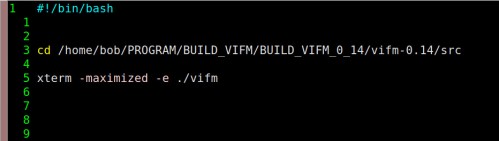
After that, I tried with the new version to run a Fip.sh script to play some music, while I was on it, I pressed ENTER to run it, but instead, the file was opened with the VIM editor.

I checked the permissions of this script, it was ok, I tested it from a console and it works.

I tried for several hours to debug and ran :execute, it did nothing. The temporary solution I found :!./%c

Any Idea why :execute is not running the script ?

I don't think this is due to the new version of vifm but rather to a local configuration.

Merci !

2 Answers

0 votes
by

:execute is for running internal commands.

Whether Vifm tries to run an executable file instead of editing it depends on 'runexec' option which is off by default.

When building from sources you typically want to set prefix and sysconf directories to avoid use of /usr/local (shown in the wiki):

./configure --sysconfdir=/etc --prefix=/usr
by

silly me, It's my fault, I had deleted this line in vifmrc:

set runexec

Thank your for pointing me at !

0 votes
by

If you prefer not to change runexec, you can also execute the :run command, provided it's added to your vifmrc: https://github.com/vifm/vifm/blob/master/data/vifmrc#L153

by

@qadzek Cool, thank you! I’ve downloaded the vifmrc file from the link you provided to compare it with mine

If you would like to make a bug report or feature request consider using GitHub, SourceForge or e-mail. Posting such things here is acceptable, but this is not a perfect place for them.
...