Welcome to Vifm Q&A, where you can ask questions about using Vifm. Registration is optional, anonymous posts are moderated. E-mail and GitHub logins are enabled.
0 votes
in vifm by

Here's and example a some iterations (gathered and tweaked many times)...

 command! FZFlocate : set noquickview
    \| let $FZF_PICK = term('locate $HOME | fzf --height 10 2>/dev/tty')
    \| if $FZF_PICK != ''
    \|     execute 'goto' fnameescape($FZF_PICK)
    \| endif

command! FZFfind : set noquickview
    \| let $FZF_PICK = term('find | fzf --height 10 2>/dev/tty')
    \| if $FZF_PICK != ''
    \|     execute 'goto' fnameescape($FZF_PICK)
    \| endif

command! fzff : set noquickview
    \| let $FZF_PICK = system("fd --hidden -t f | fzf --height 10 2>/dev/tty")
    \| if $FZF_PICK != ''
    \|      execute system('[ -f "$FZF_PICK" ] && echo goto') fnameescape($FZF_PICK)
    \| endif
    \| redraw

command! fzffix : set noquickview
    \| let $FZF_PICK = system("fd --hidden -t f | fzf --height 10 2>/dev/tty")
    \| if $FZF_PICK != ''
    \|      execute 'goto' fnameescape($FZF_PICK)
    \| endif
    \| redraw

In the 3rd one I get an "Invalid Command Name" after file selection in FZF (like in the 3rd line that I don't understand), but in all others in get a message just like (minus possible variations I didn't notice) just like the picture below...
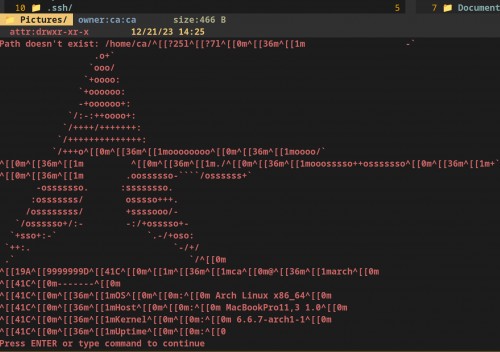
Consistent Error

I have now invested so much time on this that I'm embarrassed to admit it.

My goal is to simply fuzzy search ideally like in the little drop frame of the expanded command line in Vifm (rather than the terminal) and select the file in FZF. Then, hit enter and the frame to disappear and Vifm to auto-navigate to the directory or file selected and for that item to be actively highlighted.

My secondary goal would to be to create an alternate command that does the same thing but also if it is a file, to open the file in the default application for that file type.

Any ideas?

1 Answer

0 votes
by

I would expect "Invalid command name" from fzff only when you pick a directory, because it results in trying to run path as a command (echo goto is executed only for a file).

The picture suggests that running fzf ends up executing fetch or netfetch somehow, I don't really see it here, so it might come from script/shell function/alias behind fzf.

My secondary goal would to be to create an alternate command that does the same thing but also if it is a file, to open the file in the default application for that file type.

There is no "run" command yet, but something like this at the end after goto should do:

if system('[ -f "$FZF_PICK" ] && echo y') == 'y'
    execute 'normal l'
endif
by

Thank you for your reply! I checked for any alias altering the FZF command and there was none.

The picture I provided above is the result NOT of fzff, but rather the 3 other command scripts.

I'm a quite confused as to what is going on.

by

You can run things like this on command-line:

  • :echo term('find | fzf --height 10 2>/dev/tty')
  • :echo term('find | head -1')
  • :echo term('which fzf')
  • :echo term('type fzf')

and see what's the output and whether it matches expectations.

by

I get similar errors... I made a Loom video showing the result of each command.

https://www.loom.com/share/06491d9e5ce540d2a573a5fd6d75f517?sid=ad462ba5-fe7b-44fb-82b8-2f9915352259

Thank you for your help!

by

neofetch is somewhere in your shell configuration, ~/.bash_profile or its equivalent for Fish. You see it when you open your terminal, but it also affects external commands executed by Vifm (possibly only with term() and not system()).

by

You're awesome! And, I apologize for not catching that earlier.

When you said fetch and netfetch before, I didn't associate that with neofetch. Yes, neofetch was the issue.

My fzff command now works perfectly as long as I select a file. If take off -t f of fd -t f to simply fd it will then show me Directories as well, but fails upon seeking to pull them due to the echo goto command (I assume) as you already mentioned above.

What command variation could I use to pull directories as well?

by

Oh, the typo :) Don't know if there is such thing as netfetch.

system() command in fzff looks incomplete and could be updated to say:

[ -f "$FZF_PICK" ] && echo goto || echo cd
by
edited by

Works like a dream! Thank you so much!!!

Here's my final working code...

command! fzff : set noquickview
    \| let $FZF_PICK = system("fd --hidden -i -H | fzf --height 10 2>/dev/tty")
    \| if $FZF_PICK != ''
    \|      execute system('[ -f "$FZF_PICK" ] && echo goto || echo cd') fnameescape($FZF_PICK)
    \| endif
    \| redraw

Thanks again!

by

If I use that code:

command! fzff : set noquickview
    \| let $FZF_PICK = system("fd --hidden -i -H | fzf --height 10 2>/dev/tty")
    \| if $FZF_PICK != ''
    \|      execute system('[ -f "$FZF_PICK" ] && echo goto || echo cd') fnameescape($FZF_PICK)
    \| endif
    \| redraw

it's working recursively for dirs flawlessly!
Thank you very much.

Unfortunately the fzf search produced a wild render of vifm:

Before:
Before FZF

During FZF:
During FZF

by

Unfortunately the fzf search produced a wild render of vifm:

See this Wiki page. Since fzf is interactive, term() is preferable. If using tmux, there is also fzf-tmux which opens fzf in a different pane.

by

As usual: thank you very much.
I just thought I got something wrong since most of the fzf commands posted here include fzf --height 10 2>/dev/tty, so I suggested it should just render in the bottom part without any artefacts (which would be a nice outcome :P).

If you would like to make a bug report or feature request consider using GitHub, SourceForge or e-mail. Posting such things here is acceptable, but this is not a perfect place for them.
...